Time tracking. Simple.
Log your hours – offline, no account needed, with PDF export and OCR scan.
Taime Time Tracker is a time tracking app for employees, not for managers: you log your own shifts, breaks, overtime and extra pay on your iPhone, so you can check every payslip against a record you kept yourself.
Why track your own hours when your employer already does?
A time clock, a rota or a payroll system records what your employer sees: the scheduled shift, the badge swipe, the approved hours. What slips through is everything around it – the handover that ran fifteen minutes long, the till count after closing, the break you cut short because the floor was busy, the shift you picked up for a colleague on a day off.
Each of those is small. Together they decide whether your pay matches your work. If you ever need to raise a discrepancy, the person who kept notes on the day is in a far stronger position than the person reconstructing a month from memory. A personal record is not about distrust; it is how you check the numbers before you sign off on them.
Worked example (illustration)
Fifteen unrecorded minutes per shift, 20 shifts a month, is 5 hours. At $18 an hour that is $90 a month, or more than $1,000 a year – and if those hours pushed you past 40 in a week, US overtime rules would value them at time and a half.
How to track work hours with the app
Set your contract hours
Enter your contracted hours once, per week or per month, with a carry-over if you have one. The overtime balance then updates after every shift: target, actual and the running difference since your start date. Holidays and sick days count as met, so they do not drag the balance down.
Log the shift
Tap start and end; the hours are calculated for you. Break rules deduct breaks automatically (for example 30 minutes for shifts over six hours), or you enter the break you actually took. Night shifts that cross midnight are handled.
Tag extra pay
Mark a shift as night, Sunday, public holiday or cover with one tap, and add as many custom types as your contract has – on-call, split shift, weekend rate.
Photograph the rota
Instead of typing a printed schedule, take a photo. Taime reads the times, finds your row and applies the shifts as planned after you check them. After each shift you confirm what really happened. 20 photos are free.
Close the month
Export the month as a PDF (free, with a small Taime note at the end) and lay it next to your payslip. Days you have not confirmed yet are marked.
Checking your payslip: what to compare
- Hours paid. Does the number of hours on the payslip match your total for the pay period? Watch for periods that span two calendar months.
- Overtime. If your contract or local law pays overtime, are those hours shown separately and at the right rate?
- Extra pay. Count your night, weekend and holiday shifts. The rates come from your contract or collective agreement, so keep a copy of the relevant clause.
- Breaks. Has an unpaid break been deducted on a day you did not get one?
- Leave and sick days. Were the days you logged as absences paid as such?
Raise a difference early and in writing. Many contracts set deadlines for pay claims, and legal limitation periods differ by country – under the US Fair Labor Standards Act, for example, back-pay claims generally reach back two years, three if the violation was willful.
Estimating earnings with extra pay
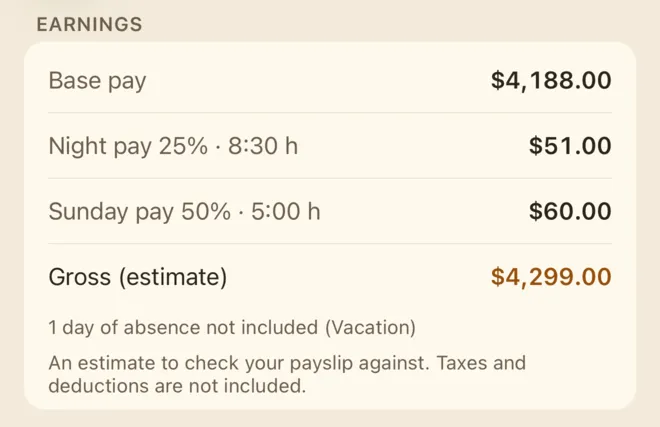
With Taime Premium you enter your gross hourly rate and the rates for extra pay from your contract, as a percentage of base pay or an amount per hour. The app shows base pay, each type of extra pay and an estimated gross total for the week and month.
Treat it as a cross-check, not a payslip: tax and deductions are not taken off, and tagged extra pay applies to the whole day’s hours rather than to the exact minutes inside a night window. It is precise enough to tell you whether something is missing.
Who it is built for
Nurses and care staff
Rotating early, late and night shifts, handovers and extra shifts. Tag cover shifts so they are not lost by month end; keep patient details out of your notes.
Hospitality
Split shifts, closing duties after the last guest, weekend work. Log the real end time, not the scheduled one.
Retail
Opening and closing routines, stock counts, late and Sunday rates set by your contract. Custom extra pay types mirror exactly what your employer pays.
Warehouse and logistics
Rotating shifts, weekend shifts, waiting for a late delivery. Copy a recurring week with one tap and fix only what changed.
Part-time and hourly workers
Hours beyond your contract are the easiest to lose. A running balance shows them the same week, not three months later.
Working-time rules in brief
United States. Under the Fair Labor Standards Act, non-exempt employees must be paid at least one and a half times their regular rate for hours over 40 in a workweek, and employers must keep records of hours worked. Some states go further – California, for example, also has daily overtime.
United Kingdom. There is no general legal right to extra pay for overtime; it depends on your contract. But your average pay for the hours you work must not fall below the National Minimum Wage, so unpaid extra hours can matter. The Working Time Regulations cap the average week at 48 hours unless you opt out, and give a 20-minute break for shifts over six hours.
European Union. Since the Court of Justice ruling of 14 May 2019 (C-55/18), member states must require employers to run a system that records daily working time. National rules on how differ.
Time tracking app, spreadsheet or paper timesheet?
| Paper timesheet | Spreadsheet | Taime Time Tracker | |
|---|---|---|---|
| Log right after the shift | if the sheet is with you | usually at a computer | on your iPhone, offline |
| Breaks, totals, balance | by hand | formulas you maintain | automatic |
| Extra pay and cover | margin notes | extra columns | one-tap tags |
| Monthly record | the sheet itself | a printout | PDF export |
Paper still has its place, especially where an employer wants a signed sheet – our free printable timesheet template covers that, blank or filled in online. For anything you want to keep up daily, the app is easier: no account, no Taime server, no ads, and your data stays on your iPhone – backed up automatically, and with Premium also in your own iCloud Drive.
What Taime Time Tracker does
Offline & no account
No sign-up, no Taime server – logging works offline, and your data stays on your iPhone with automatic backups.
Fast entry
Enter start and end time in seconds – hours are calculated for you.
Surcharges & substitution
Night shift, Sunday, public holiday or covering for a colleague – tagged with one tap and counted in.
Breaks, holidays & sick days
Deduct breaks to the minute and record holidays, sick days and days off as absences.
Work time record as PDF
Export your month as a PDF – to keep and to check your payslip against, with a small Taime note at the end. The PDF without the note and CSV are Premium.
Check your payslip
Compare your logged hours and surcharges against what you were paid. If something is off, you have your own record.
Photograph your schedule
Take a photo of your shift schedule – Taime reads the times automatically, no typing.
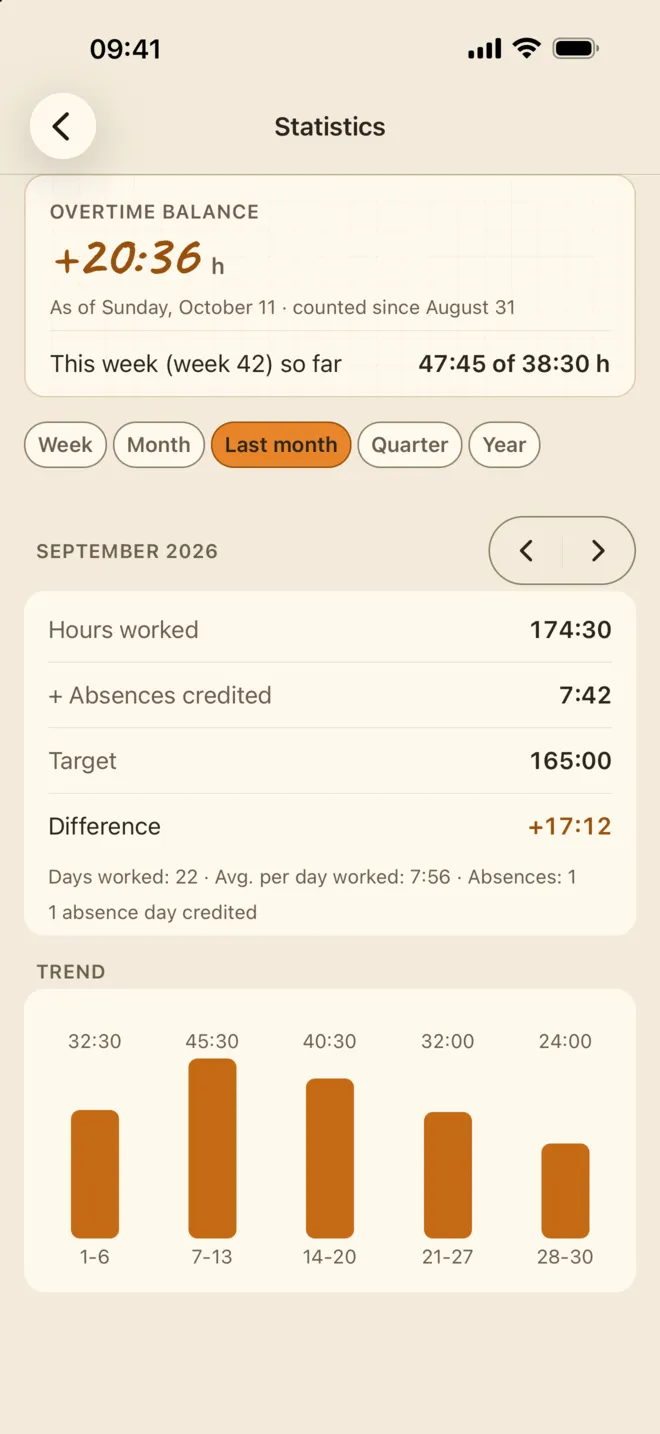
Statistics
Hours per month, daily average, days worked and weekly trend – free for this week, this month and last month; longer history with Taime Premium.
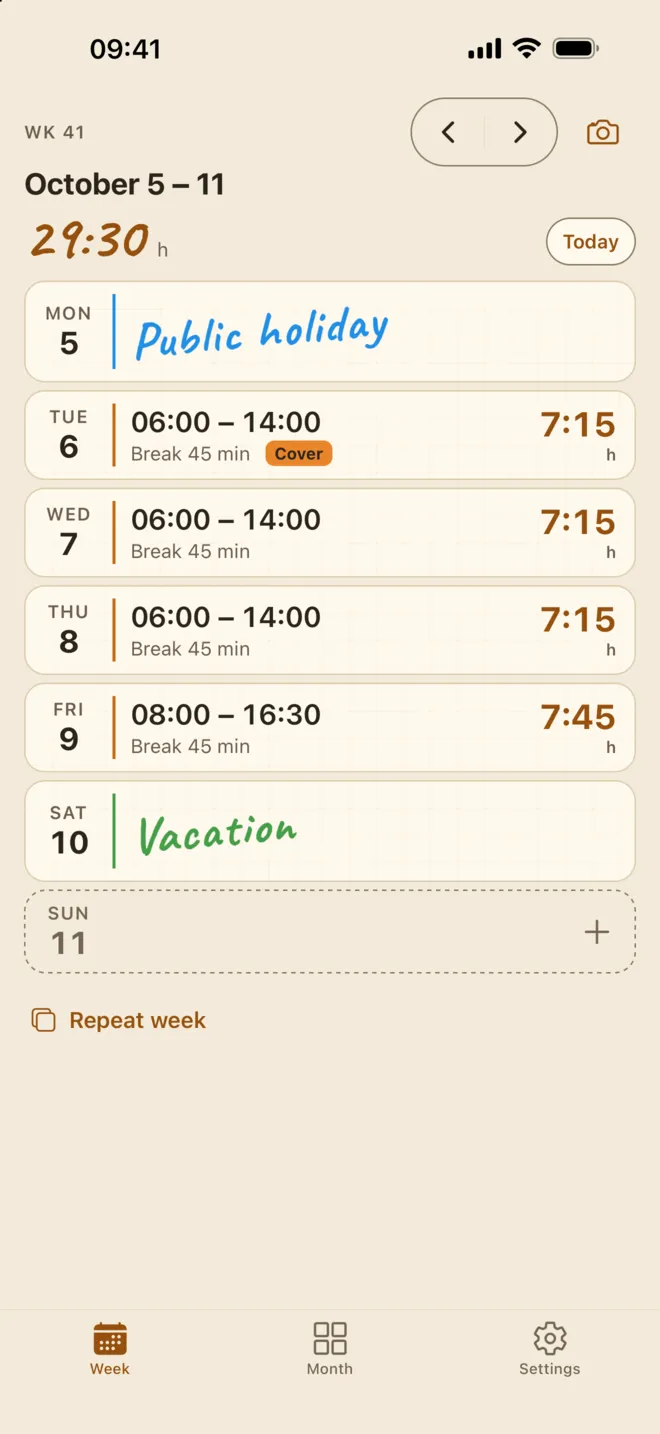
Week overview
All shifts at a glance. Tap a day to enter your times.
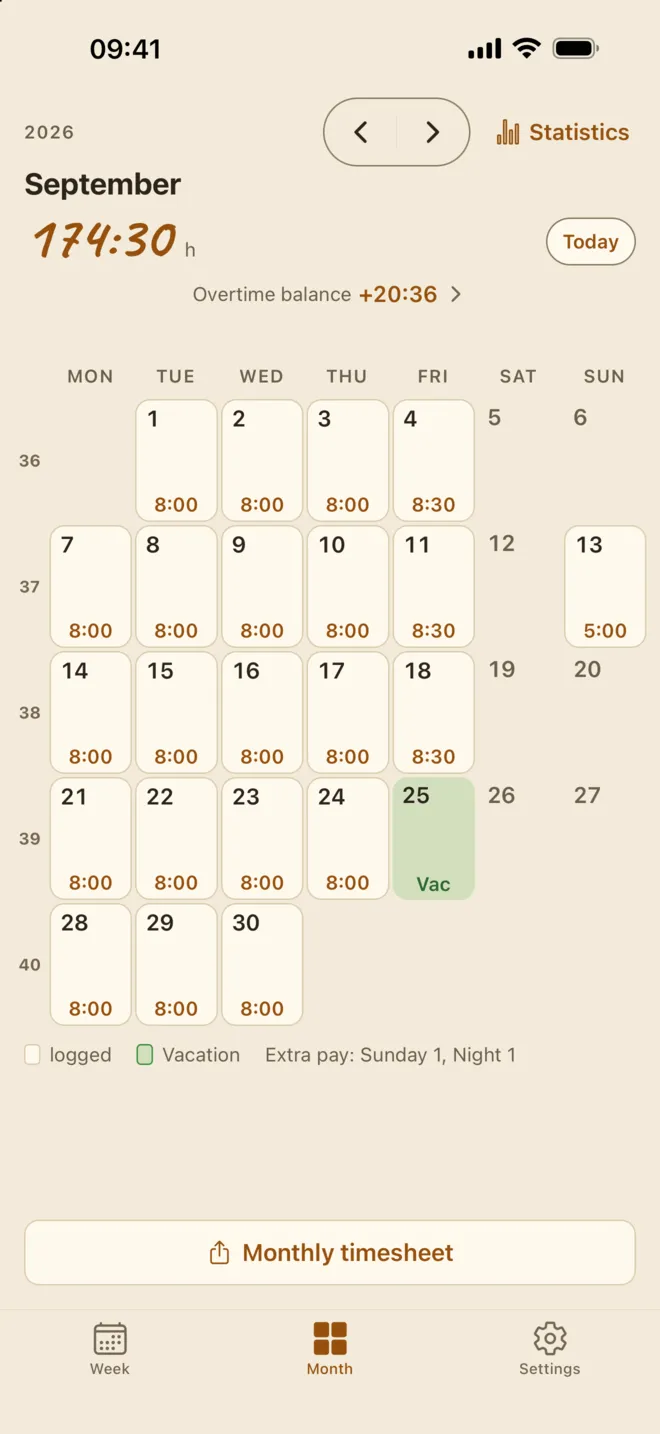
Month view
Your month as a calendar with the hours of every day, vacation and extra pay – the basis for your monthly timesheet.
Overtime & statistics
A target per week or month with carry-over, plus hours, averages and the weekly trend. This week, this month and last month are free; Premium shows statistics across all months: older weeks and months, quarters and years.
Frequently Asked Questions
Is Taime free?
Yes, logging is completely free: shifts, breaks and break rules, absences and extra pay (Sunday, holiday, night, cover) including your own types, your overtime balance, week and month views, statistics for this week, this month and last month, photo your schedule with auto-apply (20 photos free), a daily reminder, automatic backups on your iPhone and the monthly PDF with a small Taime note at the end. No ads, no account. Taime Premium adds earnings including extra pay, statistics across all months (older weeks and months, quarters and years), the PDF without the note, CSV export, photos past 20, nine more colour schemes, a shift-end reminder, calendar export, backups in your own iCloud Drive, and the Lock Screen timer, Siri and larger widgets.
Does Taime work offline?
Yes. Logging works offline, with no internet and no account. The app only goes online for purchases and, with Premium, to back up to your own iCloud Drive.
How do I track my hours?
Tap a day and enter your start and end time – the hours are calculated for you. Tag surcharges with a single tap.
What are surcharges?
Surcharges are tags like night shift, Sunday or public holiday that you add to individual entries. They appear in the month overview and in the PDF record.
Can I record substitutions?
Yes, mark any entry as a substitution and keep track of when you covered for a colleague.
Can I record breaks, holidays and sick days?
Yes. Breaks are deducted from your working time to the minute, and holidays, sick days or days off are recorded as absences. Both show up in the month overview and in the PDF.
Can I use it to check my payslip?
Yes, that is exactly what Taime is for. Because you log your own shifts, breaks and surcharges, you can compare your actual hours against what your employer paid you. If something does not add up, the PDF export gives you your own record as evidence. This is not legal advice.
Can I print my hour record?
Yes. Export the month as a PDF – from the share menu you can print it directly, save it to Files or send it by email.
Is my data safe?
Yes. All data stays on your iPhone and is backed up automatically – with Premium also to your own iCloud Drive. No account, no Taime server, no tracking.
Is Taime a time tracking app for employers or employees?
For employees. There is no team dashboard and no manager view. You log your own hours on your own phone, and nobody else sees them unless you export and share a PDF.
Does it replace my employer’s time clock?
No. Recording working time is your employer’s job where the law requires it. Taime is your personal record to compare against their numbers and your payslip.
How do I log a night shift that ends after midnight?
Enter it on the day it starts, for example 22:00 to 06:00. The app recognises that the end falls on the next day and counts the hours correctly.
Is Taime available on Android?
The iPhone app is live on the App Store. Android is in closed testing on Google Play: join the tester group with your Google account, then open the test link and install Taime from Google Play. There is no public Play Store download.
Related
- Free timesheet template (PDF) Print a blank monthly sheet or fill in your hours online.
- Taime Time Tracker overview Every feature, what is free and what Premium adds.
General information, not legal advice. Rules and figures as of October 2026; they vary by country, state and contract.
Android testers wanted
Taime for Android is in Google Play closed testing – not a public launch. Joining takes three steps, and all you need is the Google account signed in on your Android phone.
-
Join the Google Group
Join the tester group with the Google account that is signed in on your Android phone. Being in the group is what gives you access to the test.
Open the Google Group -
Become a tester
Open the test link on that phone and tap “Become a tester”. That signs you up for the test.
Open the test link -
Install from Google Play
Then find Taime on Google Play and install it as usual.

One request: please keep the app installed for at least 14 days. Google needs the test to run that long before Taime can go public on Google Play.
Google Play and the Google Play logo are trademarks of Google LLC.
Start counting today.
Every hour you log from today is an hour you can prove later. Free on the App Store, no ads and no account.